- How to use “real” UART
- Arduino’s Automatic Reset
- Linux always toggles DTR & RTS
- Espressif’s Automatic Reset
- Talking to Espressif’s Bootloader
- The ESP32-S2 reset pin
- Reproducing Espressif’s reset circuit
- The missing part of Espressif’s reset circuit
- Transistors in reverse and redundant circuits
- The serial TX path seems to be down
In my previous article, I explained how Arduino makes the life of its users easier by automatically resetting the board when the UART pin DTR (or RTS) transitions from electrically high to low. This exploits the fact that this transition happens automatically when someone or something opens the serial device on the host. That is, opening a file whose name looks like:
/dev/ttyUSB0on Linux/dev/cu.usbserial-1410on macOSCOM1on Windows
On Windows, you can avoid the transition of DTR and RTS to electrically low with the proper system calls:
HANDLE h = CreateFileA("COM1", GENERIC_READ | GENERIC_WRITE, 0, 0, OPEN_EXISTING, 0, 0);

DCB dcb = {0};
dcb.DCBlength = sizeof dcb;
GetCommState(h, &dcb);
dcb.fDtrControl = DTR_CONTROL_DISABLE;
dcb.fRtsControl = RTS_CONTROL_DISABLE;
SetCommState(h, &dcb);
On Linux, however, this is unavoidable, unless you patch your kernel. The user or program can return them to electrically high after opening the serial device, but they will first transition to low.
Let’s see this in practice.
Observing DTR & RTS when opening
First, let’s see the case of the FT232RL-based board I used in the Arduino article.

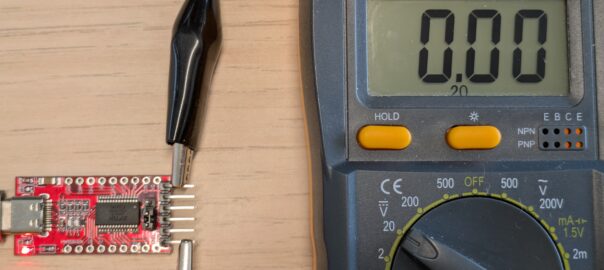
To test the behavior, connect the device with a USB cable and open the serial device. This can be achieved by running your usual serial client, such as tio or PuTTY. The effect can be observed with a basic multimeter which you can get for 5€.


The decision to transition DTR and RTS to electrically low is made by the host computer, not the FT232RL chip. You can see this by looking at the debug logs of the driver, here ftdi_sio.
$ grep DYNAMIC_DEBUG /boot/config-$(uname -r)
CONFIG_DYNAMIC_DEBUG=y
CONFIG_DYNAMIC_DEBUG_CORE=y
# CONFIG_TEST_DYNAMIC_DEBUG is not set
$ echo 'module ftdi_sio +p' | sudo tee /sys/kernel/debug/dynamic_debug/control
module ftdi_sio +p
$ # open the serial device in another terminal
$ sudo dmesg
…
[115717.989178] ftdi_sio ttyUSB0: Setting CS8
[115717.991174] ftdi_sio ttyUSB0: get_ftdi_divisor - tty_get_baud_rate reports speed 9600
[115717.991178] ftdi_sio ttyUSB0: get_ftdi_divisor - Baud rate set to 9600 (divisor 0x4138) on chip FT232R
[115717.993175] ftdi_sio ttyUSB0: enabling xon/xoff flow control
[115717.997203] ftdi_sio ttyUSB0: update_mctrl - DTR HIGH, RTS HIGH
When we open /dev/ttyUSB0, the driver sets DTR and RTS to logically high. Somewhat confusingly, the convention is that DTR and RTS are considered to be “asserted”, or logically high, when they are electrically low. This is sometimes indicated in schematics by labels that can be any of:
- nDTR / nRTS
- DTR / RTS
- DTR# / RTS#
These notations indicate that the logical meaning is inverted relative to the electrical meaning. Note that nDTR is not “the opposite of DTR”; it just indicates that, when this line is electrically high, the signal is considered to be logically low.
In any case, we can see that the ftdi_sio driver transitions DTR and RTS as expected.
Toggling DTR and RTS
We can also check the state of DTR and RTS in tio using Ctrl+t L:
$ tio /dev/ttyUSB0
[13:37:11.430] tio 3.9
[13:37:11.430] Press ctrl-t q to quit
[13:37:11.439] Connected to /dev/ttyUSB0
(I press Ctrl+t, release it, then press Shift+l)
[13:37:11.971] Line states:
[13:37:11.971]  DTR: LOW
[13:37:11.971]  RTS: LOW
[13:37:11.971]  CTS: HIGH
[13:37:11.971]  DSR: HIGH
[13:37:11.971]  DCD: HIGH
[13:37:11.971]  RI : HIGH
Here, the “line states” are referring to the electrical level, not the logical one. CTS, DSR, DCD and RI are yet other UART pins, that we are not using currently. DTR and RTS are set by the host, while CTS, DSR, DCD and RI are only read, so they all stay electrically high.
We can manually toggle them between electrically high and low using Ctrl+t g:
(I press Ctrl+t, release it, then press g)
[13:37:15.753] Please enter which serial line number to toggle:
[13:37:15.753] (0) DTR
[13:37:15.753] (1) RTS
[13:37:15.753] (2) CTS
[13:37:15.753] (3) DSR
[13:37:15.753] (4) DCD
[13:37:15.753] (5) RI
(I press 0)
[13:37:16.451] Setting DTR to HIGH
ea9629
[13:37:17.707] Line states:
[13:37:17.707]  DTR: HIGH
[13:37:17.707]  RTS: LOW
[13:37:17.707]  CTS: HIGH
[13:37:17.707]  DSR: HIGH
[13:37:17.707]  DCD: HIGH
[13:37:17.707]  RI : HIGH
(I press Ctrl+t, release it, then press g)
[13:37:18.401] Please enter which serial line number to toggle:
[13:37:18.401] (0) DTR
[13:37:18.401] (1) RTS
[13:37:18.401] (2) CTS
[13:37:18.401] (3) DSR
[13:37:18.401] (4) DCD
[13:37:18.401] (5) RI
(I press 1)
[13:37:18.755] Setting RTS to HIGH
(I press Ctrl+t, release it, then press Shift+l)
[13:37:19.443] Line states:
[13:37:19.443]  DTR: HIGH
[13:37:19.443]  RTS: HIGH
[13:37:19.443]  CTS: HIGH
[13:37:19.443]  DSR: HIGH
[13:37:19.443]  DCD: HIGH
[13:37:19.443]  RI : HIGH
[13:37:20.972] Disconnected
Unavoidable toggling of DTR & RTS on Linux
Let’s see in detail what happens when we open the serial device on Linux. I am currently running Debian 13 (trixie) with Linux 6.12.21-amd64, so I will look at the v6.12 git tag of the Linux source tree.
You can skip to the discussion on tty_port_block_til_ready() but, following the steps in logical order, from the handler of the open() systemcall:
open()syscalldo_sys_open()adds the dfd, the file descriptor of the parent directorydo_sys_openat2()creates astruct filenamefrom the filename stringdo_filp_open()tries different flags (LOOKUP_RCU,LOOKUP_REVAL)path_openat()walk the filesystem and allocatesstruct filedo_open()check and apply flags, check permissionsvfs_open()doesn’t do muchdo_dentry_open()fills thestruct file, callsf_op->openchrdev_open()in the case of/dev/*chrdev_open()populatesfile->f_opappropriately and callsfile→f_op->open- this is managed by a TTY, so
f_opis set to&tty_fops, and.openistty_open()here tty_open()callstty->ops->open- this TTY is connected through UART, so this is
serial_open()here serial_open()just callstty_port_open()tty_port_open()callstty_port_block_til_ready()
Now, this is where things start to become interesting:
int tty_port_block_til_ready(struct tty_port *port,
        struct tty_struct *tty, struct file *filp)
{
    // ...

        /* Indicate we are open */
        if (C_BAUD(tty) && tty_port_initialized(port))
            tty_port_raise_dtr_rts(port);

    // ...
}
Note that there is no user control on whether that tty_port_raise_dtr_rts() is called or not. We can continue following the call tree downwards to confirm this, and better understand what UART drivers really do in practice.
The FT232RL driver
tty_port_raise_dtr_rts()callsport->ops->dtr_rts- again, this is a UART device, so this is set to
serial_port_dtr_rts() serial_port_dtr_rts()callsdrv->dtr_rts- for this board, the driver will have set this to
ftdi_dtr_rts() ftdi_dtr_rts()callsset_mctrl()orclear_mctrl()as needed- these are defined through macros as calls to
update_mctrl()
In that last function, update_mctrl(), we can see how the USB message is formatted in a FTDI-specific way:
    value = 0;
    if (clear & TIOCM_DTR)
        value |= FTDI_SIO_SET_DTR_LOW;
    if (clear & TIOCM_RTS)
        value |= FTDI_SIO_SET_RTS_LOW;
    if (set & TIOCM_DTR)
        value |= FTDI_SIO_SET_DTR_HIGH;
    if (set & TIOCM_RTS)
        value |= FTDI_SIO_SET_RTS_HIGH;
        rv = usb_control_msg(port->serial->dev,
                usb_sndctrlpipe(port->serial->dev, 0),
                FTDI_SIO_SET_MODEM_CTRL_REQUEST,
                FTDI_SIO_SET_MODEM_CTRL_REQUEST_TYPE,
                value, priv->channel,
                NULL, 0, WDR_TIMEOUT);
The various FTDI-specific messages are explained in the header file. Although all the UART-to-USB adapter chips provide virtually the same features, each manufacturer has implemented these messages in a slightly different way, requiring different drivers. USB CDC-ACM is a standardization of the USB messages that should be used when communicating with an UART adapter over USB.
The CH340 driver
We can proceed similarly for the UART adapter I used in the “real” UART article:
- this time, the driver sets
dtr_rtstoch341_dtr_rts() ch341_dtr_rts()passes a custom code (mcr) toch341_set_handshake()ch341_set_handshake()flips it and passes it toch341_control_out()ch341_control_out()passes it asvaluetousb_control_msg()
static void ch341_dtr_rts(struct usb_serial_port *port, int on)
{
    // ...
    if (on)
        priv->mcr |= CH341_BIT_RTS | CH341_BIT_DTR;
    else
        priv->mcr &= ~(CH341_BIT_RTS | CH341_BIT_DTR);
    // ...
    ch341_set_handshake(port->serial->dev, priv->mcr);
}


static int ch341_set_handshake(struct usb_device *dev, u8 control)
{
    return ch341_control_out(dev, CH341_REQ_MODEM_CTRL, ~control, 0);
}

static int ch341_control_out(struct usb_device *dev, u8 request,
			     u16 value, u16 index)
{
    // ...
    r = usb_control_msg(dev, usb_sndctrlpipe(dev, 0), request,
            USB_TYPE_VENDOR | USB_RECIP_DEVICE | USB_DIR_OUT,
            value, index, NULL, 0, DEFAULT_TIMEOUT);
    // ...
}
This time, the details, such as the codes being passed are defined at the top of the source file itself. By comparing these two drivers, you can see how they have to send different USB messages to achieve similar features.



Leave a Reply